
Google My Business (GMB) is a free tool,Business owners can use it to create、Manage and optimize their Google Business profile。It exists to help businesses attract new customers from search and maps。
Here are some tangible benefits of claiming and optimizing your Google Business Profile:
- Improved ranking。Google shows business profiles in local search results,Well-optimized profiles are more likely to appear higher in the list。
- Increase visibility。Providing useful and accurate information helps Google display your business profile in search results,for more relevant local searches。
1. Create or claim your business profile
Please be sure to note,Google Business Profiles and Google My Business are two separate things:
- Google Business Profile:Local listings with business information。Business profiles appear on Google Search and Google Maps on desktop and mobile devices。
- Google My Business:Free tools to manage your Google Business Profile。
before optimizing anything,You first need to create or claim your Google Business Profile through Google My Business。to this end,Please clickhere,Click "Manage Now",Then log in to your Google Account。
If you've already claimed your Google Business Profile,You'll see an admin dashboard。
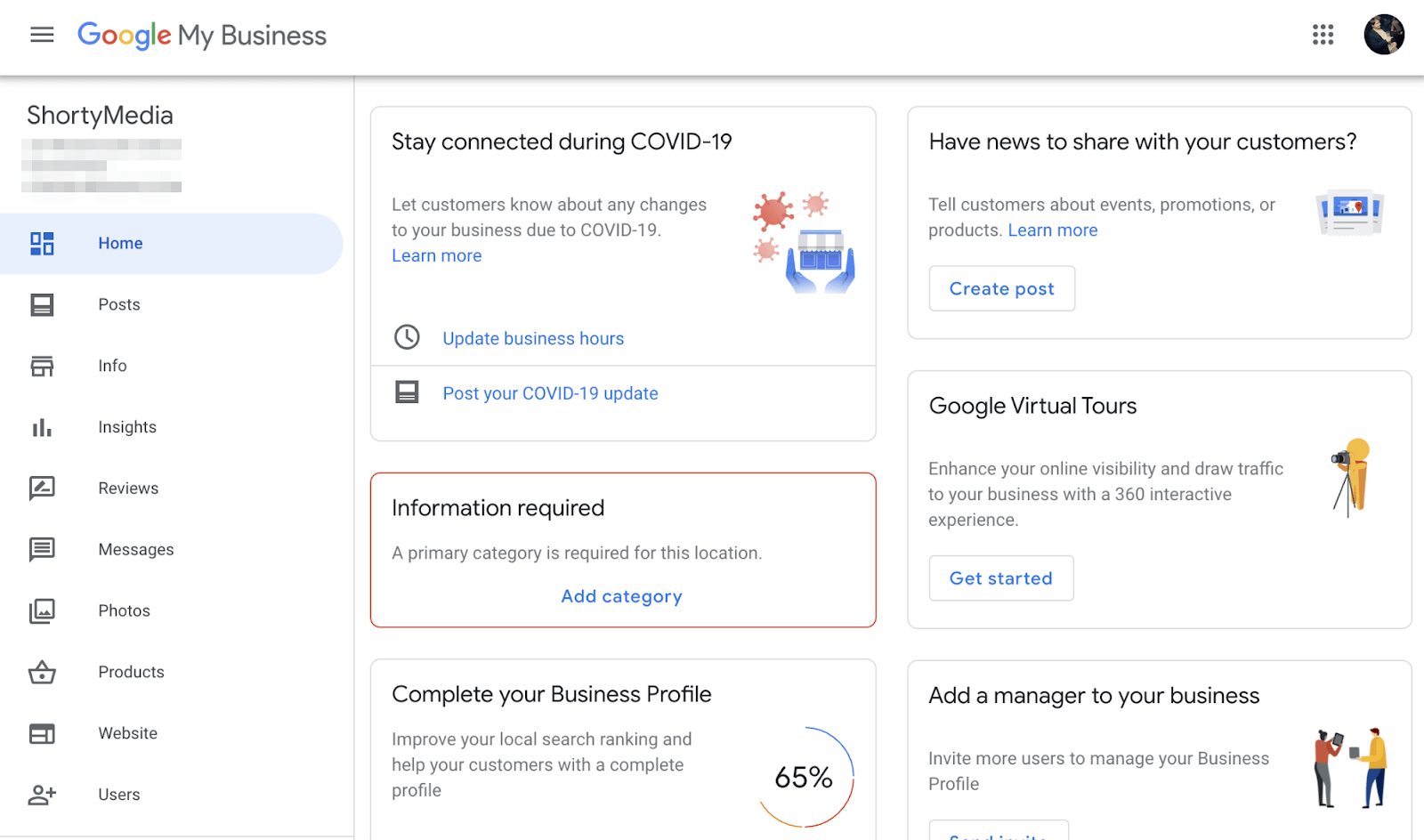
if there is not,You'll see an option to find and manage your listings。Enter your company name in the search box。If it pops up in the dropdown,Please click on the company name and declare personal data。otherwise,Click on the option to create a new business with this name。

Just know that the company name in your company profile should actually be your company name,rather than the "optimized" version with a bunch of keywords。

Google attheir guideStatement in,if you do,Your profile may be suspended:
Your name should reflect the true name of your company,This name is on your storefront、website、Used consistently on stationery,and well known to customers。[…] Don't allow unnecessary information in your company name,This may result in your listing being suspended。
2.Set your business category
Category describes what your business is,rather than what it does or sells。Always choose the main category that best describes your overall business,rather than its products or services。
For most businesses,it's easy。If you are a plumber,Please select "Plumber"。If you own a pizza restaurant,Please select "Pizza Restaurant"。But sometimes the best choice isn't so clear。
For example,Suppose you are a chartered accountant running an accounting firm。You may be wondering which of the following categories to choose:
- Accounting
- accounting firm
- chartered accountant
The answer is there is no definite answer。All three are valid options。However,Google’s advice is to be as specific as possible,So "Chartered Accountant" is probably the best choice here。
This may sound counterintuitive,But it gives you the best chance of showing up in most searches。Whether people are specifically searching for Chartered Accountants,Or search more broadly for accountants?,Chartered Accountants are all relevant results。Accountant is only relevant results for people looking for an accountant。
You can see this in the SERPs。


As for other categories,Only add them if you need to let potential customers know about products or services that don't fall into your main categories。For example,If your main category is "Chartered Accountant",There is no need to add "Accountant" as an additional category,Because it's so similar。but,If you provide bookkeeping or payroll services,Then these services might be worth adding。
3. Choose your business type
Google basically divides businesses into three types。
- store businessServing customers and customers only at their business address。Example:hair salon、cafes、bar、Shops etc.。
- Regional service companyVisit customers or provide services to customers,but does not provide services from its business address。Example:plumber、cleaning service、Mobile hairdresser and more。
- hybrid enterpriseServe customers and clients from their business address,and visit or deliver to them。Example:Photographers who shoot on location and in the studio,or restaurants offering delivery services。
If you are a location business,Please set your address and leave the service area field blank。Do this under the "Information" tab。
If you are a service area business,Please click on the options to set your service area。You can add up to 20 indivual,But it must be accurate。Don’t list every place that comes to mind,to appear in more searches。Google said,“The boundaries of your entire zone should not extend approximately 2 hour’s drive distance”,So usually one or two nearby towns or cities will suffice。If you need to be more granular,Please use postal code。
at last,Clear your address from the list。

Please note,This will only hide your business location from searchers。Customers searching within your service area can still find you。side note。If you are a regional service business serving an entire state or country,Please note that map packages containing Google Business Profiles will only appear for local searches。There is no logic in trying to optimize your business profile list to appear everywhere。That's not their purpose。for your actual website,Ranking nationally or internationally is more like a job。
If you are a hybrid business,Please follow the same steps as for service area businesses,But don't clear your address。Customers who want to visit your store or office will still need this。
4.Increase business hours
People need to know when you open and close your doors,So everyone should add their business hours。this sounds obvious,But there are tons of business profiles that don’t have this basic information。

To add your business hours,Please go toDashboard > information > Add business hours
Mark your opening dates,Then add your opening and closing times。If you close and then reopen later in the day,As is the case with restaurants offering lunch and dinner service,Please click on the "Add Time" option to add another row。You can do this as many times as you want。

5.Set holiday time
No one wants to spend time at your company,Only to find out on arrival that it has closed early due to a public holiday.。This is a frustrating way,It’s also the only way to get bad reviews.,May negatively impact your local rankings。
By adding "Special Time",Fix this problem before it becomes a problem。
Just go toDashboard > information > Add special business hours
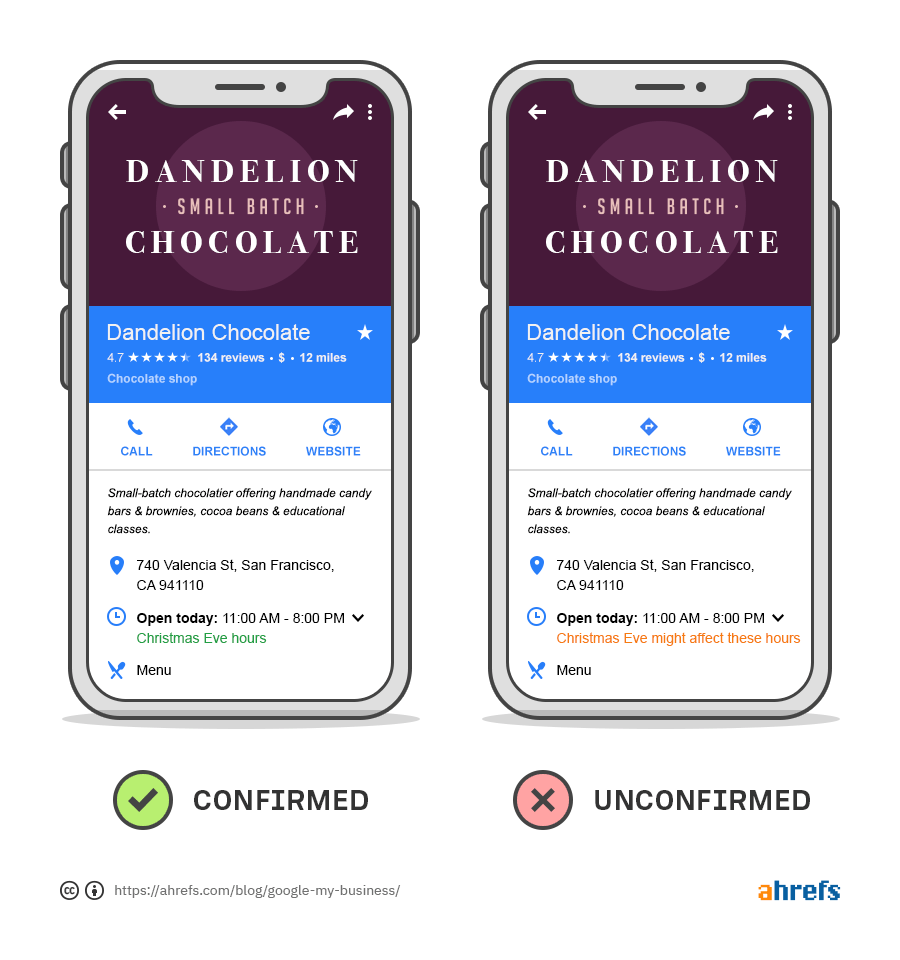
Same as normal business hours,You can add multiple hours and hours for the same day using the "Add Hours" button。For example,How many hours may you be open on Christmas Eve morning?,Then reopen in the evening。in this case,您的特殊营业时间将如下所示:

即使您的假期时间与您的正常时间相同,您仍然应该确认它们。如果您不这样做,在公共假期搜索的潜在客户可能会在您的列表中看到警告。
6. 添加您的联系方式
大多数企业都希望添加他们的网站和电话号码,You can do this on the Info tab。
If you don't have a website or don't want to be contacted by phone,You should just leave these blank。At least,You need to add at least one of these to your business profile。otherwise,Customer cannot contact you。
7. add photo
Googleexpress, Compared to businesses without photos,Businesses with photos receive more driving directions requests 42%,Lots of website clicks 35%。
任何人都可以将照片添加到 Google 商家信息中,包括客户。but,自己添加照片有助于确保您的列表看起来最好,并以正确的理由在搜索结果中脱颖而出。
谷歌有很多关于商业照片的指南,但这里是基本的:
- 添加您的徽标: 越清晰越好。
- 添加封面照片:选择能够展示您企业个性的照片。
- 添加 3 张以上的外部照片。 全天从多个角度获取它们,以帮助客户随时找到您的业务。
- 添加 3 张以上室内照片。 捕捉您企业的装饰和氛围以吸引顾客。
- 添加 3 张以上的产品照片。展示您最受欢迎的商品。
- 添加 3 张以上“工作中”的照片。 展示您的团队为客户提供服务。
- 添加 3 张以上团队照片。 通过展示您的团队成员和员工的个性来使您的企业人性化。
说到照片,似乎越多越好。BrightLocal 的一项研究 Discover,与一般企业相比,拥有 100 多张照片的企业接到的电话多 520%,方向请求多 2,717%,网站点击多 1,065%。

certainly,这并不意味着您需要立即添加数百张照片。从上面的指南开始,随着时间的推移添加更多照片。
只需确保为它们全部命名——例如,bridesmaid-dress.jpg,而不是 IMG_574921.png。
推荐阅读: Image SEO:12 个提高自然流量的可操作技巧
8.添加产品和服务
如果 Google 为您提供了将产品和服务添加到您的商家信息的选项,那么这通常是值得的,因为它可以帮助您的商家信息出现在更相关的搜索中。
For example,这家婚纱公司将他们提供的所有婚纱列为产品:

结果,他们的列表似乎出现在对特定礼服和品牌的相关本地查询中,例如“lillian west wedding dress sheffield”:

只需确保将所有相关详细信息添加到您的产品和服务中,包括名称、price、类别、描述以及指向您网站上相关产品或服务页面的链接。请随意复制并粘贴您网站上的描述和详细信息,以加快此过程。这样做没有坏处,也不会导致重复的内容 问题。
9. 获得更多评论
according toBrightLocal 的 2020 年研究,评论对于本地地图包排名变得越来越重要。谷歌自己表示,“来自客户的高质量、正面评价可以提高您的业务知名度,并增加购物者访问您的位置的可能性。”
有趣的是,谷歌还会在结果中突出显示包含来自搜索者查询的相关关键字的评论。

但是你如何真正获得评论?
这里有几种方法:
- 问客户。如果您与客户面对面互动并觉得他们有积极的体验,请他们留下评论。
- 创建并共享评论链接。许多客户不知道如何在 Google 上留下评论。谷歌知道这一点,这就是为什么他们为所有企业提供创建可共享评论链接的选项。在“Google 我的商家”>“主页”>“获取更多评论”中找到它。
- 创建“发表评论”卡片。印制实体卡片以感谢客户惠顾并提示他们留下评论。附上您的简短评论链接或二维码,让事情变得简单。
- 在您的电子邮件签名中包含您的评论链接。 如果您通过电子邮件与客户沟通,这是获得更多评论的一种很好的被动方式。
Please note, 为客户提供奖励以换取评论违反了 Google 的条款,因此请避免使用提供折扣或免费物品作为回报等策略。
10.回答问题
人们可能对您的业务有疑问,但您的商家信息没有回答。这就是为什么 Google 允许搜索者询问有关企业的问题,并从企业主和更广泛的社区那里得到答案。

许多企业并没有掌握这些问题,而是让其他人来提供答案。这很少是理想的,并且通常会导致客户看到有关您的业务的误导性或不准确信息。
For example,有人问他们是否需要在当地酒吧提前预订,结果却从当地社区得到了相互矛盾的答案:

这只能带来负面影响。自相矛盾的答案可能会阻止那个人和其他人一起来访,或者让他们因为没有提前预订而被拒之门外而生气。正是这些人会留下负面评论并破坏您当地的 SEO。
出于这个原因,我们建议采取积极主动的问答方式,有两种方法可以做到这一点:
- 打开问题和答案通知。每当有人询问有关您的业务的问题时都会收到提醒,然后立即回答。不要担心收到很多烦人的通知。除非您的公司非常受欢迎,否则问题很少见。Please note,默认情况下会启用这些警报,但值得在设置中仔细检查。
- 预先提供常见问题解答。大多数网站都有常见问题解答页面,其中包含常见问题的答案。您可以在您的 Google 商家信息中自行提出并回答这些问题。只需确保您登录的是用于“Google 我的商家”的同一 Google 帐户,这样答案就会被标记为来自商家所有者。
11. 发布更新
帖子可让您分享与您的业务相关的更新、优惠和活动。将它们视为状态更新。它们显示在您的 Google 商务面板底部附近的轮播中。

谷歌偶尔也会在“地图包”结果中展示相关帖子。
For example,如果我们搜索“woodburn oregon sympathy flowers”,Valley Pacific Floral 就会在地图包中排名。谷歌展示了他们的一篇帖子,其中提到了我们搜索中的“同情之花”一词。

目前尚不清楚该企业是否因为该帖子而排名在这里,或者它是否会排名。either way,它都有助于列表在 SERP 中脱颖而出,并吸引更多潜在客户的关注。
要创建帖子,请转到“帖子”选项卡并单击按钮以创建您的第一篇帖子。
以下是针对您的帖子的一些提示:
- 使用好照片。确保它们清晰、光线充足且构图合理。
- 用标题激发行动。努力创造有吸引力的报价。当你可以说“整个周末所有商品的 50%”时,不要只说“现在开始销售”。
- 要精确。避免像瘟疫一样含糊不清。不要说“这是欢乐时光!” 当你可以说“欢乐时光!每周六下午 5 点到 6 点,所有饮品均可享受 50% 的折扣!”
- 要及时。不要等到情人节才发布您的特别烛光晚餐。那时人们已经做好了计划。
- 不要只是为了它而发帖。 许多指南说帖子“向 Google 发送积极信号”并“尽可能频繁地发布”。我们不同意。除非你有有意义的事情要说,否则不要发帖。
在Google 的这份简短指南中详细了解如何创建出色的商业帖子。
12.设置消息
启用消息功能会在您的 Google 商家信息中添加一个按钮,以便搜索者可以直接向您发送消息。

谷歌还在谷歌地图中显示了“消息”按钮。
To enable this feature,请下载适用于iOS orAndroid的“Google 我的商家”应用。从那里登录到您的 Google 帐户,转到“客户”选项卡,然后转到“消息”选项卡,然后点击选项以打开消息传递。side note。Google 不会为此使用您的电话号码。消息显示在应用程序中,因此在非商务电话上安装该应用程序是安全的,不会出现隐私问题。
13.填写其他所有内容
“Google 我的商家”中的大部分重要选项现已完成,但值得花一分钟时间填写剩下的任何内容。这将根据您为业务选择的类别略有不同。
For example,餐馆可以列出他们的菜单项,美发沙龙可以使用第三方提供商来允许搜索者直接从他们的业务资料中预订约会,etc.。
不要太担心“优化”剩余的字段。尽可能准确地填写它们,您就可以开始了。
14.优化您的网站
您是否注意到当 Google 的网站提到您要搜索的内容时,有时会在搜索结果中显示商家资料?

该企业的简介中没有任何地方提到真皮填充剂。出现是因为该短语在他们的实际网站上,谷歌选择了该网站。

therefore,值得一提的是您在网站上销售的产品和服务。
certainly,大多数网站已经在一定程度上做到了这一点。如果您销售伴娘礼服,那么您的网站可能会提到这一点。but,很容易错过当地人可能正在搜索的重要产品和服务。要找到这些,请将您的网站已经提到的产品和服务输入到关键字研究工具 (如关键字资源管理器)middle,然后检查报告的同时排名 。这会显示您的关键字排名靠前的网站也为其排名的其他关键字。
For example,上面的网站已经提到了真皮填充剂、emervel 填充剂、juvederm 填充剂、radiesse 填充剂和唇部增强剂等产品和服务。
让我们将它们粘贴到关键字资源管理器middle,并检查报告的 Also rank。

it's here,我们看到该网站未提及的产品和服务,例如脸颊填充物、眼部填充物、唇部注射和下巴填充物。网站总是有可能没有提到这些服务,因为他们不提供这些服务,但考虑到他们的其他服务,他们很可能至少提供了一些服务。如果是这样的话,他们可能应该将它们添加到他们的网站上。
For example,我们假设这家公司提供唇部注射,但忘了在他们的网站上谈论这一点。
如果我们搜索这个关键字,我们会在搜索结果中看到一个地图包。

这告诉我们查询具有本地意图。in other words,在 Google 中输入此内容的人正在寻找提供此服务的本地企业。therefore,企业可能值得在其网站上的某个地方提及该服务。
Now,重要的是要注意,这并不是懒惰地将关键字“散布在您的网站副本中”。那行不通的。它只会使您的网站看起来不专业。therefore,请确保以合理的方式向您的网站添加产品和服务,For example:
- 修改您的主页副本以提及更多产品和服务(不要在这里发疯,保持自然和可读性高于一切)。
- 为个别产品或服务添加新页面。
- 在常见问题解答页面上提及您提供的其他产品和服务。
最后的想法
Implementing most of the optimizations above should take no more than half an hour。after,You will have a well-optimized business profile,without falling victim to the common optimization mistakes many business owners make。If neededGoogle My Business Verification ServiceYou can contact us。
but,You should still check everything regularly to ensure your profile is accurate。(Once every few months is fine)。
It is also important to realize,Your Google Business Profile is designed to appear for queries with local intent。in other words,Searchers are looking for businesses in their area、Product and service inquiries。This is a misunderstanding made by many business owners。If you want people across the state、Find your business nationally or internationally,You need to invest in SEO outside of Google My Business。This means doing keyword research to find the right keywords,Optimize your pages using on-page SEO,and build links to outperform your competitors。